


 [tta_listen_btn]
 September 25 2025

Hybrid cloud merges public cloud, private cloud, and on-premises infrastructure into a unified, adaptable, and cost-effective IT framework.
One of its standout benefits is agility, enabling organizations to swiftly adjust to changes and capitalize on growth opportunities by quickly provisioning computing resources. Moreover, hybrid cloud integration enables companies to adopt technologies such as artificial intelligence (AI), the Internet of Things (IoT), and edge computing, thereby gaining a competitive edge.
Currently, 54% of the enterprises are using it for mission-critical workloads, and if you are looking to adopt one. Then bookmark this blog, as we will discuss the infrastructure and components of a hybrid cloud in detail. In addition to challenges, you can encounter and how you can effectively overcome them for efficient deployment. First, let’s begin with an introduction to enterprise hybrid cloud.
What Is An Enterprise Hybrid Cloud?
It is a computing environment that integrates private and public cloud computing infrastructure, allowing seamless data transfer between the two. This fusion helps balance and optimize various IT needs, enabling flexibility, scalability, and efficiency. All in all, this approach is highly lucrative as it combines the scalability and cost-effectiveness of public cloud resources with the control, security, and performance of private cloud systems.
Most organizations adopt enterprise hybrid clouds to run essential workloads on a private cloud, while using the public cloud for temporary or non-sensitive tasks. Ensuring optimized resource utilization and supporting dynamic scalability, making it best suited for modern businesses.
Let us tell you all about the hybrid cloud components to help you effectively understand how it functions.
Components of Enterprise Hybrid Cloud
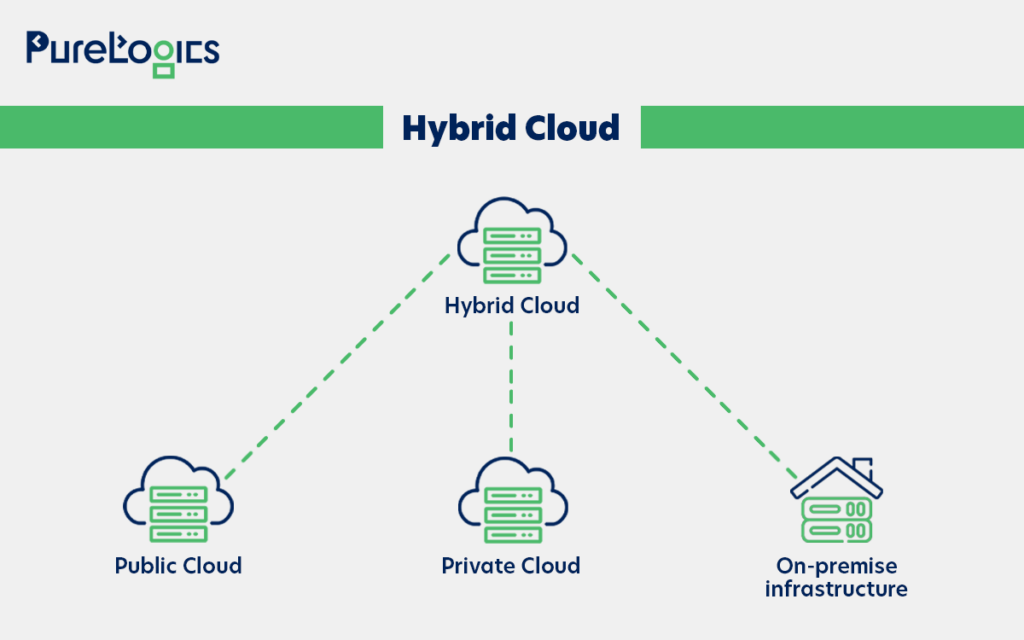
The three main components of enterprise hybrid cloud are on-premises infrastructure, public cloud, and private cloud. Understanding the components can help businesses optimize their performance and reduce costs.
- Public cloud: These are shared computing services offered by third-party vendors over the internet, offering scalable and on-demand resources.
- Private cloud: It is a cloud environment dedicated to a single business or organization managed either on-site or through a third-party provider.
- On-Premises infrastructure: It refers to tangible resources located within the company, such as servers and storage systems.
Below is the pictorial representation for the full comprehension of hybrid cloud components.
In recent years, hybrid cloud technology has become popular, and the reason behind this is the efficiency that comes with its installation. But what makes them efficient? It is their 5-layered architecture, so let us tell you about that!
5 Layers of the Hybrid Cloud Architecture
The complete comprehension of these layers is necessary as this will help you identify the key areas that need attention in your hybrid cloud platform. Starting with the first layer, which is infrastructure.
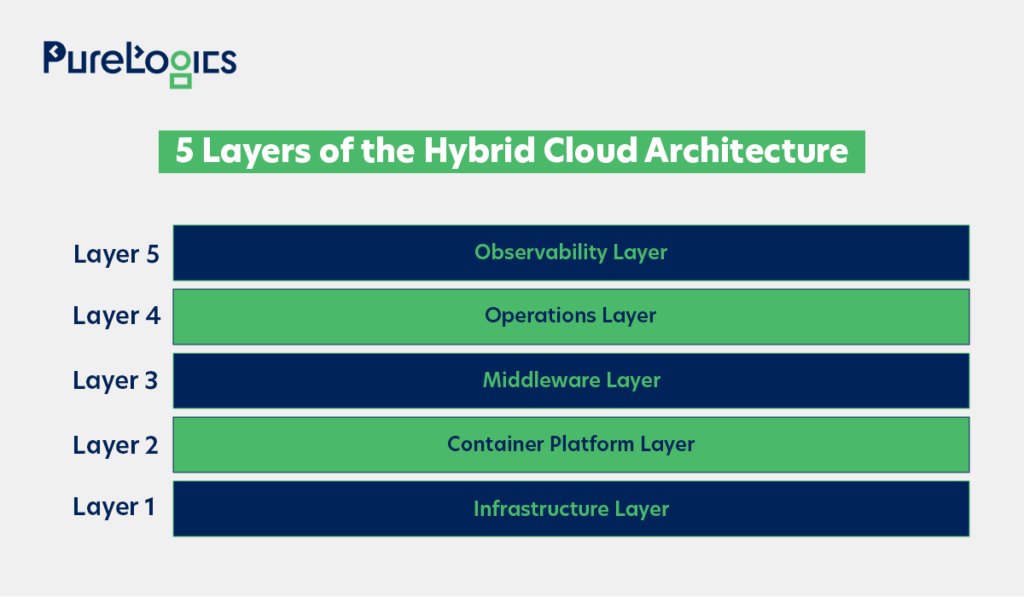
Let us take a closer look at each of these layers in detail, breaking down their role and challenges.
Layer 1: Infrastructure
It is the basis of the hybrid cloud architecture, and complexity often lies in the networking layer when it comes to interconnecting an on-premise or domain controller (DC) network to the cloud. Therefore, it is important to first evaluate your policies, such as bring-your-own IP, hard-coded IP addresses, gateways, and latency.
Layer 2: Container Platform
This layer gives the unified foundation for running applications consistently across both on-premise and cloud environments. It abstracts away from the underlying infrastructure, such as servers, VMs, networks, and storage. Plus, it delivers a standardized environment for developing, deploying, and managing containerized applications. The key aspects include:
- Consistency across environments: Ensures the same runtime orchestration and management experience whether the workloads run in the data center or on the public cloud.
- Orchestration & scheduling: Platforms like Kubernetes handle scaling, load balancing, and high availability of containerized applications.
- Portability: Containers contain the application and dependencies, making it easier to move workloads across environments without rework.
- Integration with CI/CD: It connects CI/CD pipelines to facilitate faster development, testing, and deployment of applications.
- Governance & Security: Provides centralized policy enforcement, access controls, and monitoring to maintain compliance across hybrid environments.
To make this concept concrete, let us look at how an application can be split and run on a public and private cloud using Kubernetes. The code below is a blueprint for both environments, but with different settings. This is the core of how the container platform offers consistency.
Part 1: On-Premises Deployment (This part of the application runs inside the company’s private data center).
apiVersion: apps/v1
kind: Deployment
metadata:
  name: onprem-app
  labels:
    app: onprem-app
spec:
  replicas: 2
  selector:
    matchLabels:
      app: onprem-app
  template:
    metadata:
      labels:
        app: onprem-app
    spec:
      containers:

name: app
      image: mycompany/onprem-service:v1
      ports:
containerPort: 8080
Part 2: Cloud Deployment (This part of the application runs in a public cloud, like AWS EKS or Azure AKS).
apiVersion: apps/v1
kind: Deployment
metadata:
  name: cloud-app
  labels:
    app: cloud-app
spec:
  replicas: 3
  selector:
    matchLabels:
      app: cloud-app
  template:
    metadata:
      labels:
        app: cloud-app
    spec:
      containers:

name: app
      image: mycompany/cloud-service:v1
      ports:
containerPort: 8080
In this example, the on-premises part of the application runs with 2 copies (replicas: 2), while the cloud part runs with 3 copies (replicas: 3). Each part can be scaled independently based on its needs, using the on-premises infrastructure for core workloads and the cloud for handling sudden, temporary increases in demand.
Layer 3: Middleware Layer
Its role is to provide the shared services that applications require. You can think of it as a glue that connects infrastructure and applications. Furthermore, the middleware layer covers:
- AI and analytics: Tools to process logs, monitor workloads, and enable automation.
- Data services: Databases, messaging systems, integration frameworks, and caching.
- Security & compliance: Identity access, encryption, vulnerability scanning, and shift left testing.
Layer 4: Operation Layer
This layer ensures workloads across on-premises and cloud environments are monitored, secured, and continuously enhanced. It brings together automation, security, and pipeline operations so that the platform can run smoothly, and it covers following aspects given below:
- AIOps: Utilizes logging and observability data to detect incidents, automate responses, and support end-to-end service management.
- SecOps (Security Operations): Integrates continuous monitoring, compliance checks, and enforcement of security across hybrid environments.
- DevOps (Platform Operations): Integrates platform engineering and DevOps practices to manage capacity, coordinate environments (dev,test,QA, production), and streamline deployments.
- Service catalog: Provides a set of pre-approved services for users that they can consistently use across hybrid cloud environments.
Layer 5: Observability Layer
It provides the organization with a complete view of its applications and services across both on-premises and cloud platforms. The role of this layer is to make hybrid environments easier to monitor and optimize. Furthermore, the observability layers cover the aspects below:
- Visibility: Brings together data from multiple clouds and on-prem systems into a unified dashboard to manage applications consistently.
- Proactive issue detection: Helps in spotting errors and issues to speed up patching, upgrades, and performance tuning.
- Event correlation & analytics: Combines logs, metrics, and AI insights to analyze workload patterns, which helps reduce the risk of downtime.
Now that we have explored the function of each layer, let’s tell you about how enterprise hybrid cloud works.
How Does an Enterprise Hybrid Cloud Work?
You might have come across blogs that have explained the working of the enterprise cloud in a complex manner. But let us explain the process in a super easy way!
Foundation Integration
The process starts with the fundamental act of combining the resources and services from two separate computing environments (typically, private cloud and public cloud). This combination is not just a simple connection. It requires integration, orchestration, and coordination to allow for the sharing, shifting, and synchronization of information.
Establish Secure Interconnectivity
The important part of the process is the development of a powerful network that allows the two environments to communicate. This strong hybrid cloud networking is established by using various methods to ensure data transfer is efficient and secure. Furthermore, the interconnectivity between environments is typically created using a combination of:
- Local Area Network (LAN)
- Wide Area Network (WAN)
- Virtual Private Network (VPN)
- Application Programming Interfaces (APIs)
Moreover, some networking and connectivity challenges can arise, which can go beyond just setting up LAN, WAN, or VPN. Below these challenges are in detail:
- Latency management: Hybrid environments contain multiple data centers and clouds. Latency can affect the performance, specifically for real-time workloads like financial transactions or video processing. Moreover, using edge nodes or local zones helps decrease the latency.
- Hybrid DNS resolution: Applications often need to resolve hostnames across both on-premises and cloud environments. A common challenge here is split-brain DNS, where the same hostname may resolve to different IP addresses depending on whether it is queried from the cloud or on-premises. Misconfigured DNS can break workloads, leading to failed connections or routing traffic to the wrong endpoint. To effectively address this, the Hybrid DNS solutions are implemented, such as AWS Route 53 Resolver, which offers inbound and outbound endpoints that let AWS workloads resolve on-premises DNS names, and on-premises workloads resolve AWS private hosted zones.
- Routing between environments: Ensuring packets flow efficiently requires careful routing policies. However, the misconfigured routes can create security gaps or bottlenecks.
- Dedicated interconnects: For high-throughput, low-latency needs, organizations use dedicated links like AWS Direct Connect or Azure ExpressRoute instead of depending on public internet connections.
- SD-WAN adoption: Adopting SD-WAN can help manage traffic across hybrid environments, enhancing performance and reducing operational complexity.
Implement Resource Abstraction & Management
The final step is managing and provisioning the resources across the integrated environments. This is made possible by using key technologies and dedicated resources management software:
- Resource aggregation: Technologies such as virtualization, containerization, and software-defined networks and storage are used to abstract and aggregate resources from both public and private clouds into a single pool.
- On-Demand provisioning: Dedicated management software allows organizations to swiftly allocate these aggregated resources to different environments and enable on-demand provisioning. Ensuring that applications have the resources they need, regardless of whether those resources are on-premises or in the public cloud.
Once the resources are abstracted and centrally managed, it’s now time to apply this flexibility to real-world deployment patterns (ranging from cloud bursting to disaster recovery. Let us tell you all about it!
Hybrid Cloud Deployment Patterns
After the architecture is in place, it’s time to put the hybrid cloud to work via specific deployment patterns given below:
- Cloud bursting: A workload runs on a private cloud but bursts into the public cloud when demand rises, ensuring scalability without overburdening the private infrastructure.
- Disaster recovery and backup: A hybrid setup allows important backups to be stored in the cloud while the primary workloads run on-premises. During outages, workloads can shift automatically to cloud resources.
- Stateful vs Stateless applications: Stateful apps, like databases and ERP systems, need careful replication and synchronization strategies to maintain consistency. Whereas the stateless apps (e.g., microservices and APIs) can easily scale across environments.
- Edge computing integration: Hybrid environments allow workloads to run closer to end-users or devices while still being centrally managed.
In addition to all this, scaling and managing of enterprise hybrid clouds requires modern tooling. Let us tell you about that, too, below.
Automation and Tooling
Managing a hybrid cloud manually is impossible, however tools below can help in the effective management:
- Centralized monitoring: Tools like Prometheus+ Grafana, ELK Stack, or Datadog offer overall visibility into hybrid workloads.
- Infrastructure as Code (IaC): Tools like Terraform, Pulumi, and Ansible help ensure the infrastructure is consistently deployed across both clouds.
- Orchestration pipelines: CI/CD tools like Jenkins, GitHub Actions, or ArgoCD help ensure fast, reliable application deployment across environments.
It can be hard to maintain the balance between cost efficiency and performance, even with the help of these tools. So, below are the strategies to maximize the efficiency of enterprise hybrid cloud within your budget.
Cost Efficiency and Optimization Strategies in Hybrid Cloud
Hybrid cloud offers flexibility for enterprises, but it can get expensive without cost governance and performance optimization. However, the key optimization strategies given below can help:
- Data egress cost: Shifting the data out of public clouds poses charges, so workloads should be designed to reduce the unnecessary transfers.
- Performance optimization: Keep latency-sensitive workloads on-premise and transfer elastic, compute-heavy tasks to the public cloud.
Conclusion
The successful implementation of hybrid cloud is not only about architecture but also requires good deployment strategies and cost-performance optimization. Moreover, orchestration of work across private and public environments can be a challenge. But carefully planned execution can make a huge difference, like it did for enterprises that partnered with us. Our team with 20+ years of experience years of experience has helped organizations design, deploy, and optimize a hybrid cloud that has helped them increase scalability and get measurable ROI. Check out our cloud transformation enablement services to know more or talk to our specialists.
Frequently Asked Questions
When is the hybrid cloud approach most effective?
A hybrid cloud approach is most effective for businesses that need a mix of control, scalability, and cost-efficiency. It allows the organization to maintain sensitive workloads in private environments while taking advantage of scalability and advanced features of the public cloud for non-sensitive operations.
How does hybrid cloud support regulatory compliance?
By keeping sensitive data within private cloud or on-premises systems, organizations can deploy strict security and governance controls. Moreover, the public clouds can be reserved for less sensitive workloads, helping businesses stay compliant without any compromise on scalability and efficiency.
What industries can take advantage of hybrid cloud environments?
Industries such as healthcare, finance, retail, and manufacturing can benefit greatly from the hybrid cloud environments. Primarily because these industries often handle sensitive data, and to comply with regulatory requirements, they require scalable solutions to manage increasing workloads.